
IF you have created the original Condition in the likes of Microsoft Word (MSO) or the like, any formatting that you saved in that document will be embodied in the text you copy from Word to the Ultimate Text Box.
To avoid inclusion of external source formatting you can choose one of the two options below.
1. Create your Conditions in "Notepad" and right click "paste as plain Text "
2. Select the text that you want to return to its default formatting.
In Word and Publisher
On the Home tab, in the Font group, click Clear All Formatting.
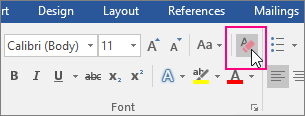
The Clear All Formatting icon is highlighted on the Home tab
then Copy (CTRL+C) the desired text and Paste (Right Click "paste as plain text") in to the Condition field in Ultimate