
Creating a Client Profile as part of a PNR in the Selling Platform in a format which WILL automatically create the Client Profile in Vto as part of the PNR Import Process is totally reliant on using the following Amadeus structure.
It should be noted that FFN, SSR and SRDOCS data MUST be in Full format structure and requires that YOUR office is using
Amadeus Web Services
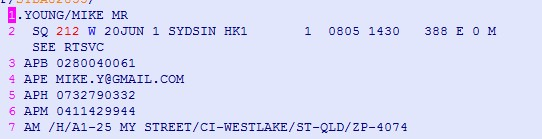
nm1young/mike mr = the pax name
am/h/a1- is the address/ci- is the city or suburb/st- is the state/zp- is the Zip or postcode
aph- is the phone1 field or the HOME Number
apb- is the phone2 filed in Vto or the Business number
apm- is the Mobile number
ape- is the primary email address
Airline Required Format
SR CTCE person//gmail.com/P1;
SR CTCM 61087000232/P1;
Please NOTE the field separators / and - they are mandatory
To include the FFN (Frequent Flyer Number), SSR (Meal Request) or SRDOCS (Passport Data) please use the Standard Amadeus format