
 | In this example you may have receipted a payment using the wrong method e.g. EFTPOS and had allocated it to the trip. |
In this case you would need to Undo the allocation first – to do this you go to Trip - “Trip Details – Client Payments” view,
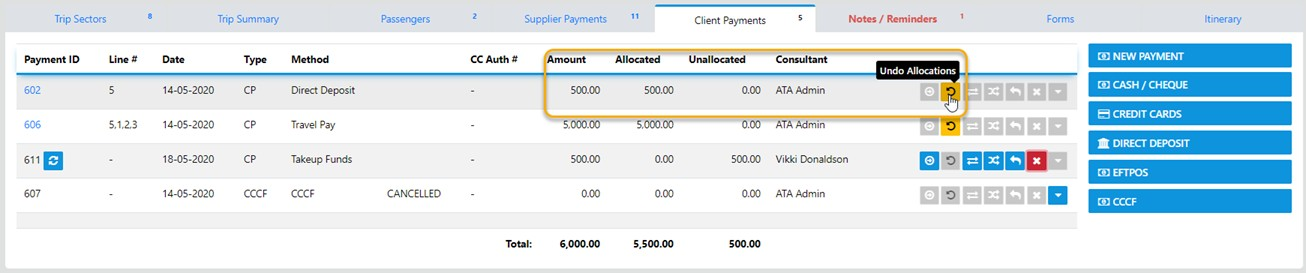
Next you select the Undo Allocations Icon and the allocation will be reversed
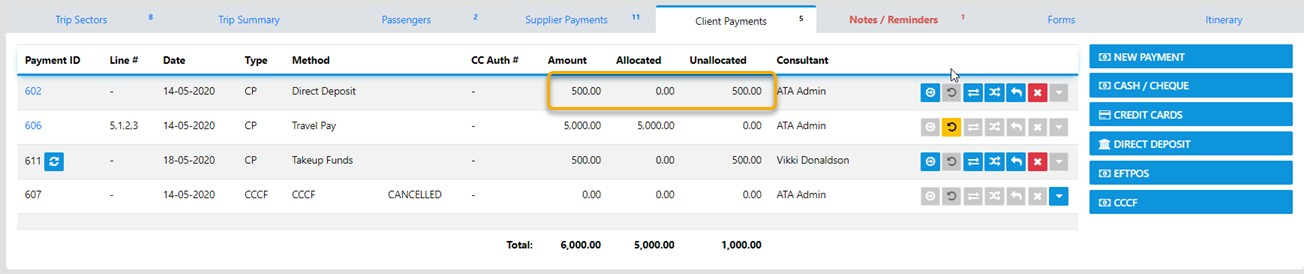
From here the options are as follows:-

 | The option allows for the allocation of the unallocated funds |
 | The Undo option is out of play when it is Greyed out |
 | The allows for Transfer of funds to another Trip for the Current Client |
 | The allows for Transfer of funds to another Client's Trip |
 | The the Reverse/Undo is out of play when it is Greyed out |
 | The allows for Refund of ALL or Part of the Unallocated Funds |
It is a GOOD practice to always check the Trip Summary after making any changes to the Trip of the financials