
The best practice you can adopt in Vto with regard to processing merchant fees is to adhere to the following processes.
Always use the product code MSF (Merchant Service Fees) as the product if you are creating them manually and always select Merchant Fee
This ensures that a separate sector for that is auto created (ensure the payment method is correctly configured)
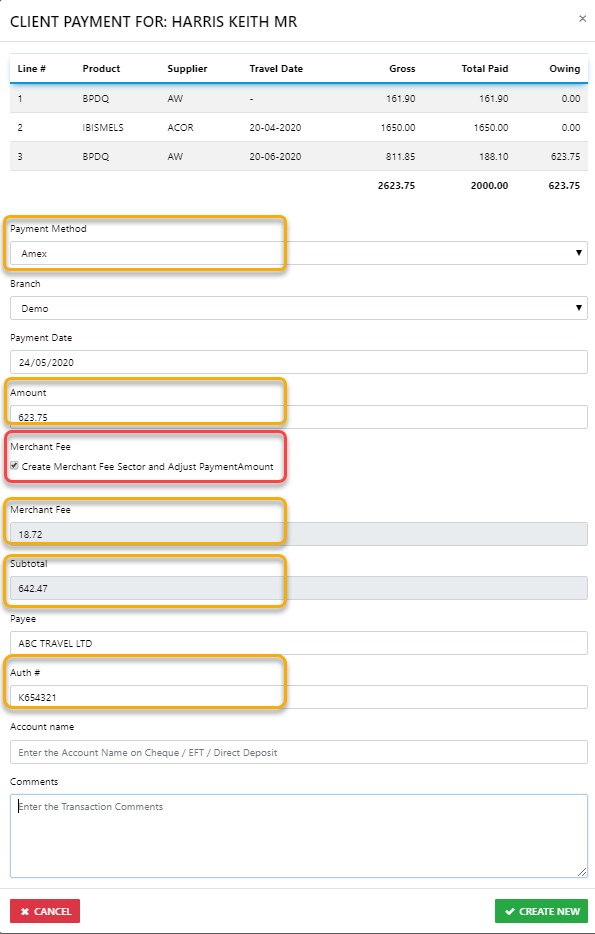
As you can see from the above example the payment WAS 1102.08 but when we added the Merchant Fee as set in the Admin - Payment Methods Zone. The Merchant Fee has been added to then Subtotal
- Using the Payment Gateway automatically creates a Merchant Service Fee sector with the supplier with the Supplier being the Card you selected e.g. AMEX, VISA etc.
- The merchant fee should be recorded with the unit price reflecting the actual amount you are charging your client and the net remit being that which your supplier will be charging you, you can if you wish the couple little commission on the way through in this process
- When your credit card statement arrives simply select pay supplier then choose the appropriate supplier and select all the sectors appropriate to the charges on the credit card statement, these of course will be paid using the appropriate payment method as at the date the actual fees were made and use VTO's default payment method ID