
Non Gateway Merchant Fee Procedures
Recording agency absorbed merchant fees in VTO
Use this procedure when a client payment is processed directly through the payment gateway website and the travel agency absorbs the merchant fee. Record the fee manually in VTO so that it reduces commission and can be reconciled against the net bank deposit.
1 Set up a reusable sector template
Create a sector template for the merchant fee. This allows you to select the same template each time a manual transaction occurs. The TravelPay example below shows the template details and default pricing.
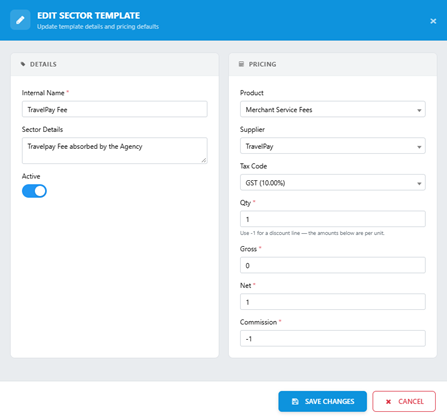
Figure 1 TravelPay merchant fee sector template
Save the template using Save Changes. Use the template when a merchant fee needs to be recorded against a trip.
2 Record the merchant fee on the trip
Select New Templated Sector and choose the merchant fee template. Enter the fee amount to be deducted from commission. In the example below, Commission is -$83.98 and Net Payable is $83.98.
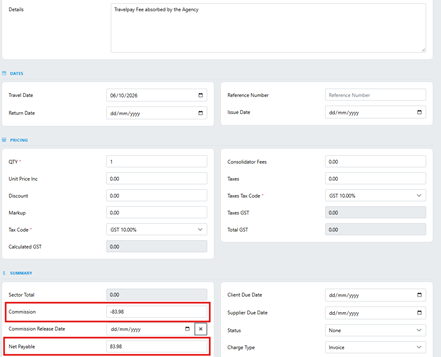
Figure 2 Merchant fee deducted from commission
3 Record the supplier payment
Create a supplier payment for the credit card fee, dated the same day as the client payment. The example below shows the $83.98 fee as paid to TravelPay.

Figure 3 Supplier payment recorded against the fee sector
4 Reconcile the net bank deposit
The finance team can tick off the supplier payment for the fee and the gross client payment together. Their difference equals the net amount deposited into the bank account.
Reconciliation item | Amount |
Gross client payment | $5,278.00 |
Less merchant fee | $83.98 |
Net bank deposit | $5,194.02 |

Figure 4 Fee and client payment selected for reconciliation